
Your show dashboard
Event links, the sales summary, the configuration settings you control, analytics and the history of changes.
Every show has a dashboard. Open it from Shows in the organization sidebar: the list shows active shows first. Change the status filter to see archived ones, or filter by date and search by name.
The dashboard has four tabs: Overview, Configuration, Analytics and Activity.
Overview
Event links
Quick links to the parts of your show visitors use:
- Event Home Base opens your public show site, once it is published. See Build your Homebase.
- Registration Map View opens the floor plan where exhibitors buy booths. If it reads Registration isn't set up correctly, select it to fix booth sales. If it reads No online registration, booth sales are not part of your show.
- Map Editor opens your floor plan in the editor, on the first map in your order. While Map D is still building your map, you see Map currently in production instead.
Link to a specific map
If your show has more than one published map, Event Home Base and Registration Map View each have an arrow on their right edge. The button itself opens the page on your first map. Select the arrow, then a map, to copy a link that opens that page on the map you picked instead.
The Homebase link opens your Homebase floor plan page, so that page has to be turned on. If it is off, the menu says so. See Build your Homebase.
Sales summary
If Booth Sales is included with your show, you see booths sold and your fill rate, revenue by payment method (after refunds), orders with an outstanding balance, and a 12-week sales chart. Export CSV downloads every order with its buyer, status, total, amount paid and balance. Shows without Booth Sales do not display the sales summary.
Show details
The show's name, dates, venue, time zone and web address are shown for reference. Map D manages them. Contact Map D if one needs to change.
Configuration
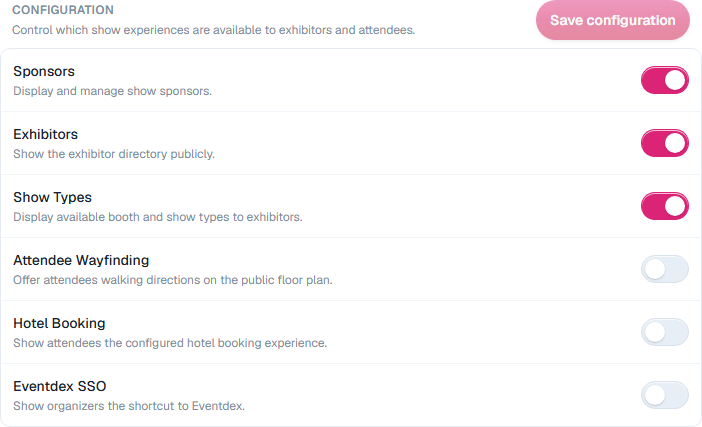
Configuration holds the show settings you can change yourself. The Tiers at the top show which parts of Map D your show includes. Contact Map D to add one.
| Setting | What it does |
|---|---|
| Sponsors | Display and manage show sponsors. |
| Exhibitors | Show the exhibitor directory publicly. |
| Show Types | Display available booth and show types to exhibitors. |
| Attendee Wayfinding | Offer attendees walking directions on the public floor plan. |
| Hotel Booking | Show attendees the hotel booking experience set up for your show. |
| Eventdex SSO | Show organizers a Switch to Eventdex shortcut in the account menu. |
Changes take effect when you select Save configuration.
Analytics
See how people use your Homebase and floor plan, with sections for show stats, exhibitors, exhibitor engagement, sponsors, sessions, speakers and attendees. See Show analytics and reports.
Activity
A log of changes to the show: what changed, the old and new values, who changed it and when.
Still need help?
Contact your Map D account team. Include your show name and, if something looks wrong, a screenshot of the page.
Last updated September 29, 2026